Lorem ipsum dolor sit amet, consectetur adipiscing elit. Suspendisse varius enim in eros elementum tristique. Duis cursus, mi quis viverra ornare, eros dolor interdum nulla, ut commodo diam libero vitae erat. Aenean faucibus nibh et justo cursus id rutrum lorem imperdiet. Nunc ut sem vitae risus tristique posuere.
Lorem ipsum dolor sit amet, consectetur adipiscing elit. Suspendisse varius enim in eros elementum tristique. Duis cursus, mi quis viverra ornare, eros dolor interdum nulla, ut commodo diam libero vitae erat. Aenean faucibus nibh et justo cursus id rutrum lorem imperdiet. Nunc ut sem vitae risus tristique posuere.
Lorem ipsum dolor sit amet, consectetur adipiscing elit. Suspendisse varius enim in eros elementum tristique. Duis cursus, mi quis viverra ornare, eros dolor interdum nulla, ut commodo diam libero vitae erat. Aenean faucibus nibh et justo cursus id rutrum lorem imperdiet. Nunc ut sem vitae risus tristique posuere.
PHP2Shell Hides in the Runtime Your Dependency Scanner Never Reads
Tim Thacker
·
October 22, 2026
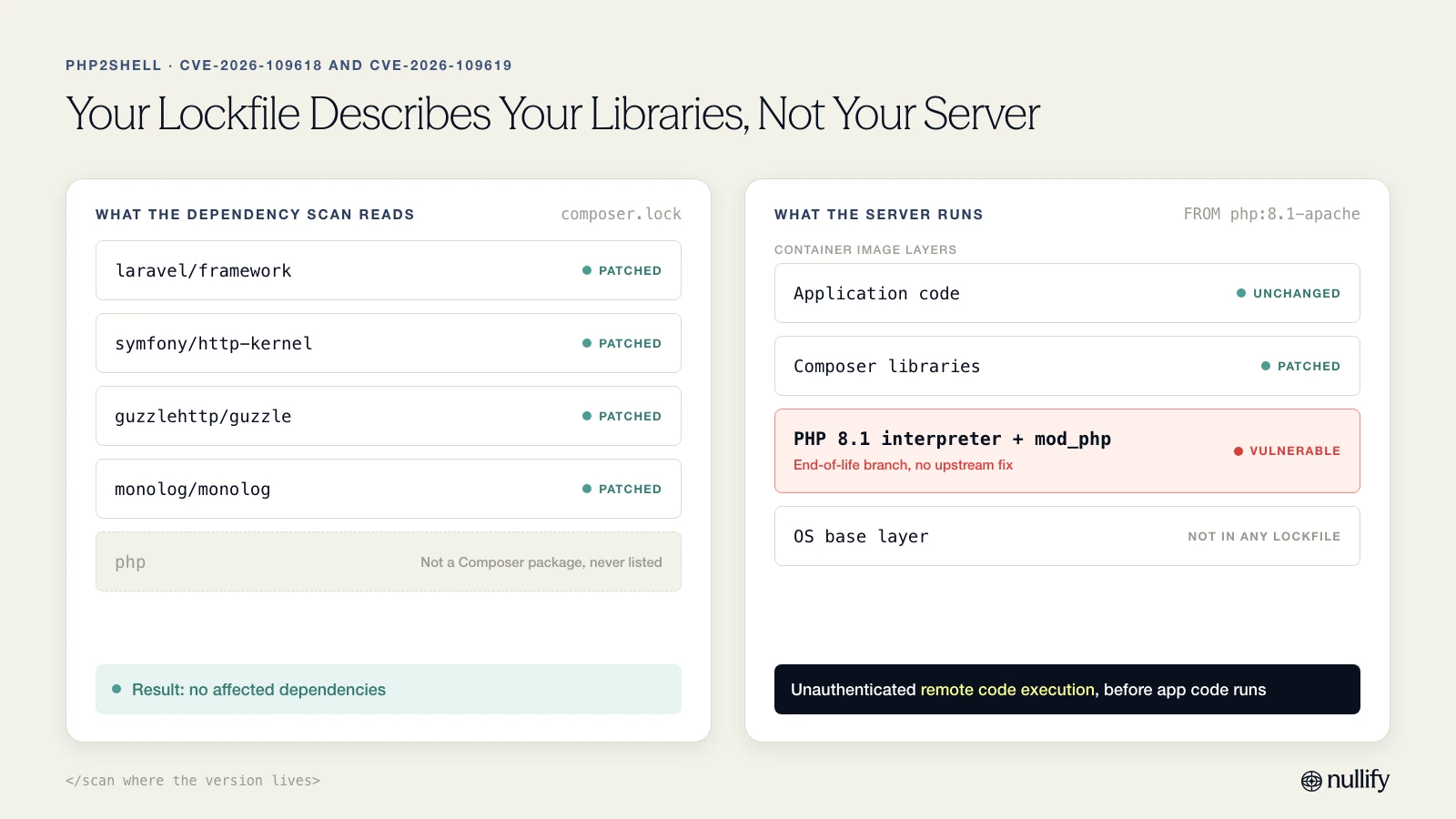
A dependency scan finishes and reports no affected packages. composer.lock is clean. Every library is on a patched version, and the dashboard is green.
Two directories up, the Dockerfile starts with FROM php:8.1-apache. That image ships a PHP interpreter with two critical memory-safety bugs in it, and an unauthenticated attacker can turn either one into code execution on the server with crafted HTTP requests. The scanner never looked at that line. It was never built to.
The lockfile describes your libraries. The image describes your server.
That gap is what makes PHP2Shell dangerous, and it is why we spent the day after the fix going through customer images, Dockerfiles and provisioning code instead of manifests.
PHP2Shell is a bug in the interpreter, not in a package
PHP2Shell is two critical vulnerabilities in the PHP interpreter itself, rated CVSS v4 9.2:
CVE-2026-109618 is memory corruption in PHP's out-of-memory handling.
CVE-2026-109619 is a use-after-free of request state that PHP keeps between requests.
Either one lets an unauthenticated attacker run code on the server with the web worker's privileges, just by sending crafted HTTP requests. No login, no vulnerable plugin, no application bug required.
The reach is essentially any PHP that serves web traffic: PHP-FPM, Apache mod_php, php-cgi, FrankenPHP and LiteSpeed. On Apache mod_php, the demonstrated exploit fires before the application's own code runs. Input validation and framework request filtering never get a turn. Application-level defenses don't help when the application never starts.
The timeline was short. Details leaked on October 20, 2026. PHP shipped emergency fixes on October 21 in 8.5.12, 8.4.27, 8.3.36 and 8.2.35. A public proof-of-concept appeared quickly and attack traffic was reported. Branches 8.1 and older are end-of-life and get no fix.
Your lockfile can't see your runtime
Most dependency scanners read lockfiles and package manifests. That is the right place to look for a vulnerable library. It is the wrong place to look for a vulnerable language runtime.
PHP2Shell never appears in composer.lock, because PHP is not a Composer dependency. The vulnerable component is whatever PHP version is baked into a container image or installed on a server. It lives in a base image tag, a FROM line, or a package install in provisioning code.
So a team can run a vulnerable runtime while its scanner reports "no affected dependencies." Both things are true at once. The report is correct about what it read. It just didn't read the thing that matters.
A clean manifest scan is a statement about your libraries. It says nothing about your interpreter.
What we did in the first day
A verified advisory before anything else
A threat record is only as good as its version ranges. Get the affected range wrong and every match built on it is wrong too, in both directions: missed exposures and false alarms.
So we started with the disclosure itself. We researched it and cross-checked the affected and fixed versions against six independent vendor and research write-ups. Then we published a verified threat record with the correct affected-version ranges. Every customer assessment that followed matched against those ranges.
Every environment, three kinds of evidence
We assessed every customer environment: 15 environments and about 3,700 actively scanned repositories. Because the flaw is in the runtime, dependency data alone would have produced the same false green as the scan above. We went to the places a PHP version actually lives:
Container image scans, to find PHP base images and the PHP versions actually installed in them.
Dockerfiles, compose files and provisioning code, to find PHP versions pinned there.
A targeted search of repository source for PHP runtime usage.
Each source answers a different question. The image tells you what is running. The Dockerfile tells you what gets built next. The source search tells you where PHP exists at all. Together they turn "do we use PHP?" into a list of repositories, images and versions.
What we found
8 of 15 environments run PHP somewhere.
5 had images on an affected PHP version: 19 vulnerable or likely-vulnerable images across 26 repositories.
8 of those images run end-of-life PHP (7.x, 8.0 or 8.1). Upstream will never patch them. They need a version upgrade, not a rebuild.
The rest had either no PHP or PHP whose version needed customer confirmation.
Note the wording: "vulnerable or likely-vulnerable." Not every image maps cleanly to a fixed version. When it doesn't, we say so.
Why some answers are "confirm with us"
The hardest case is distribution-packaged PHP. An OS vendor can ship a package whose version string looks affected while it carries a backported fix. Matching the string would call it vulnerable. Ignoring the string would call it safe. Both are guesses.
We didn't upgrade either guess into a verdict. Where the evidence couldn't settle it, the assessment says the version needs customer confirmation and names exactly what to check. An honest "unconfirmed" costs a customer a quick check. A wrong "safe" costs them a server.
A plan each customer can act on
Each affected customer got a threat investigation in the Nullify platform. Each one lists the specific affected repositories, Dockerfiles, images and PHP versions, with a remediation plan for that environment. We followed up with a direct message to each customer, so nobody had to find it on a dashboard.
The guidance, in order of risk:
Rebuild internet-facing images first, starting with Apache mod_php. That is where the exploit runs before application code does.
Treat floating tags as unpatched until you rebuild. A tag like php:8.4-apache is only fixed once the image is rebuilt and redeployed. The container you are running does not update itself.
Upgrade end-of-life PHP. 7.x, 8.0 and 8.1 get no fix, so rebuilding them changes nothing. Move them to a supported branch.
Check distro backports for OS-packaged PHP. Confirm with your distribution whether the installed package carries the fix, rather than trusting the version string.
Review logs back to October 20 for signs of exploitation. With a public proof-of-concept and reported attack traffic, patching closes the door. It doesn't tell you whether anyone already walked through it.
This is what triage and remediation is for: turning a disclosure into a short list of owners, files and fixes within a day, instead of a backlog item that waits for the next scan.
Scan where the version lives
PHP2Shell won't be the last runtime-level vulnerability. The same blind spot applies to any interpreter or system library that ships in an image instead of a manifest. When your tooling says "no affected dependencies," ask what it actually read.
The lockfile describes your libraries. The image describes your server. Check both.